Modbus RTU Connection
Published

NanoDetect PRO Modbus RTU Connectivity
Modbus RTU (RS-485) Communication Guide
The NanoDetect PRO sensor supports Modbus RTU communication over an RS-485 serial interface. Configuration is performed using the mobile application.
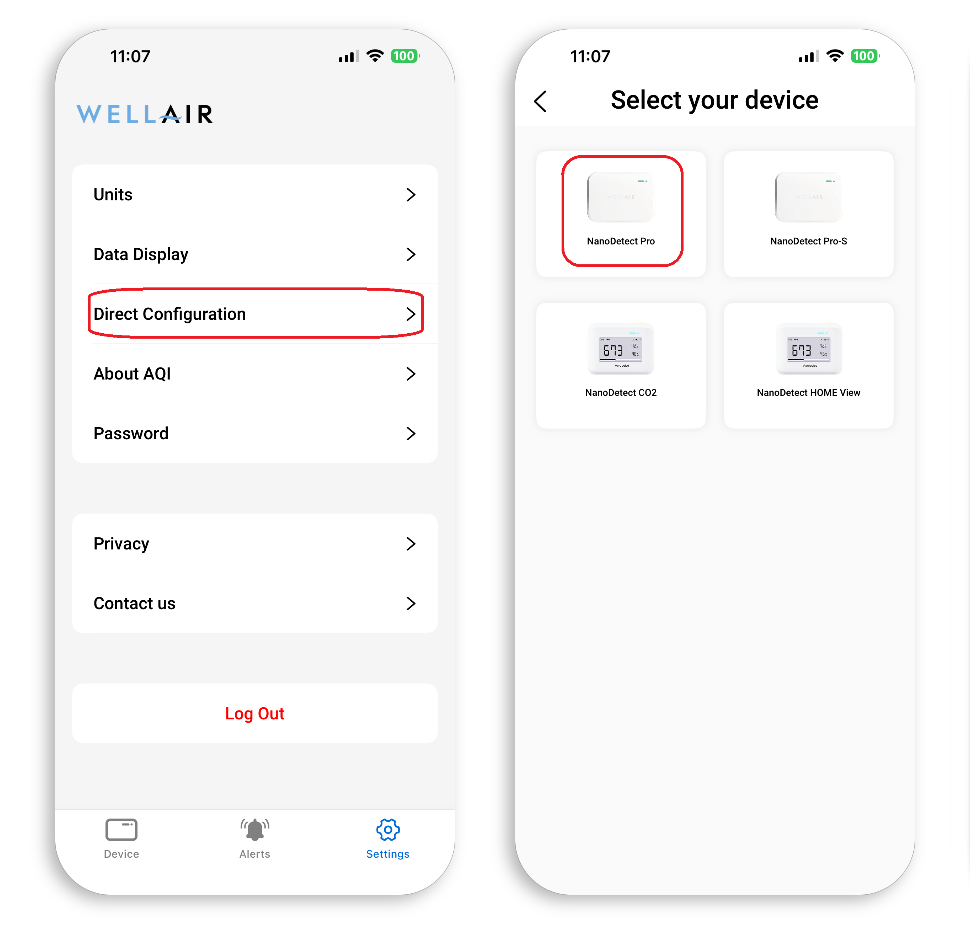
Step 1 Open the mobile application and select “Settings” (bottom right of the screen).
Step 2 Select “Direct Configuration.”
Step 3 Select the sensor type “NanoDetect PRO.”
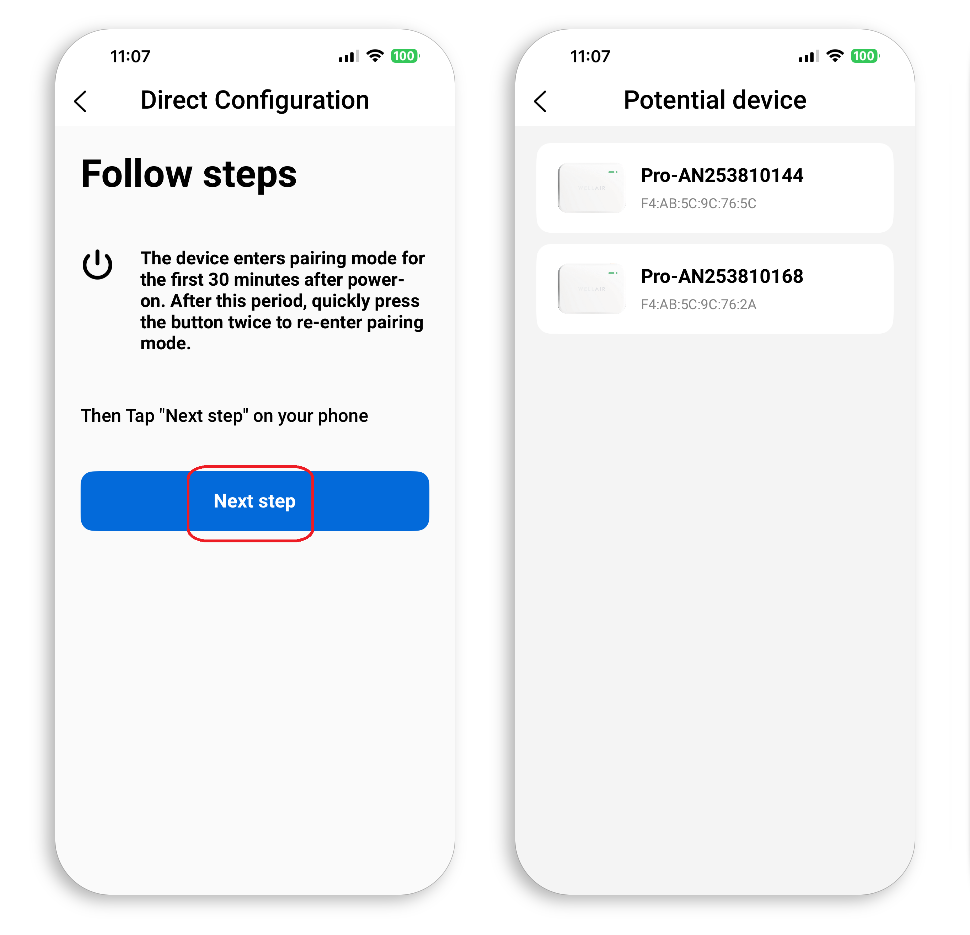
Step 4 Follow the on-screen instructions to place the device in configuration mode. This is achieved either by power cycling the sensor (disconnect and reconnect the power supply) or by pressing the sensor button twice.
Step 5 Select “Next Step” to continue.
A list of available devices will be displayed. Devices are identified by MAC address and device name.
Step 6 Select the appropriate NanoDetect PRO from the list.
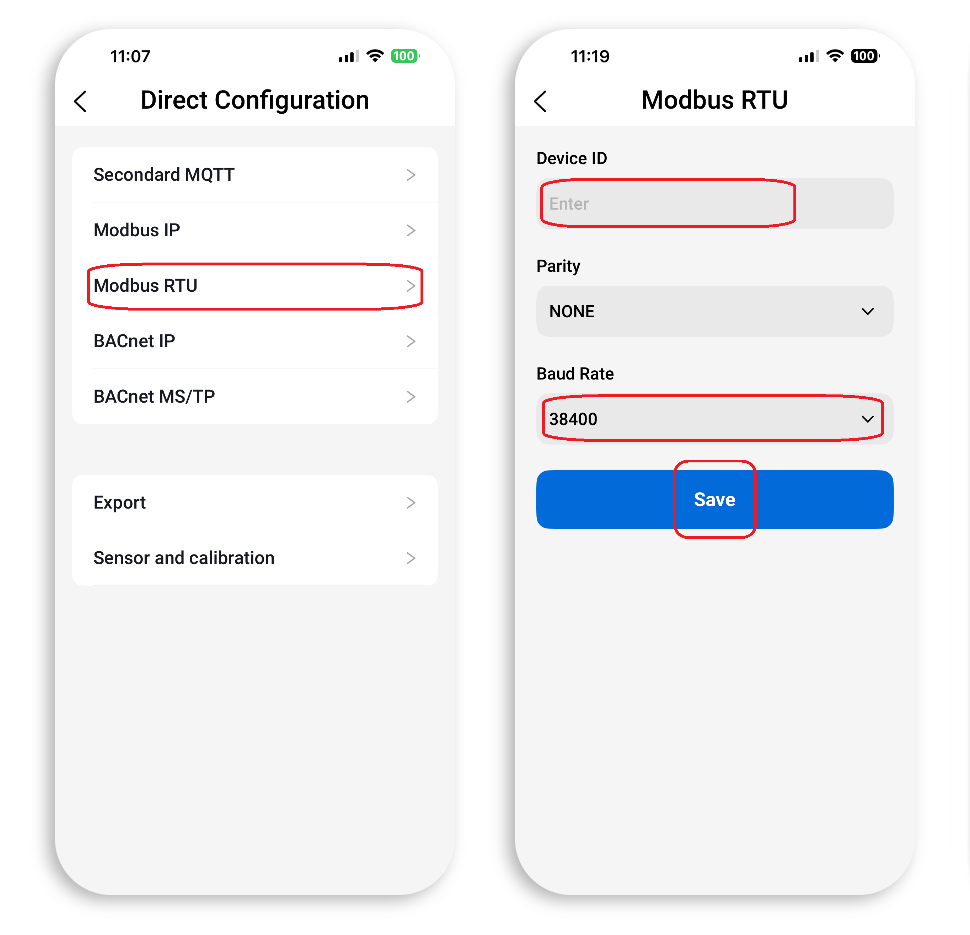
Step 7 From the communication options, select “Modbus RTU.”
Step 8 Enter the required Modbus parameters:
• Device ID (Slave Address)
• Parity (None, Even, or Odd)
• Baud Rate
Step 9 Select “Save” to apply the settings. A long audible beep confirms successful configuration.
Communication Parameters
The Device ID (Modbus slave address) must be unique within the same RS-485 segment to prevent address conflicts.
The Baud Rate and Parity settings must match all other devices on the same RS-485 bus. Mismatched serial parameters will prevent successful communication.
RS-485 Wiring
The NanoDetect PRO provides an RS-485 two-wire differential interface. Connect the twisted pair conductors to the designated A and B terminals on the rear of the device (RS-485 non-isolated differential pair).
Maintain correct polarity across the entire bus (A-to-A and B-to-B). Reversed polarity will prevent communication.
The RS-485 network shall be wired in a linear daisy-chain topology. Star or branched configurations are not recommended.
If the NanoDetect PRO is installed at the physical end of the RS-485 bus, a 120 Ω termination resistor shall be installed across terminals A and B to provide proper line termination. Termination should only be applied at the two extreme ends of the bus, in accordance with standard RS-485 / Modbus RTU installation practice.
Modbus Protocol
Data Type
Data length = 8
Stop bits = 1
Parity = none / even / odd
Baud Rate = 1200 / 2400 / 4800 / 9600 / 19200 / 38400 / 57600
Commands
Read holding register

Read input register

Write single register

• Read Input Register (0x04) command 01 04 0038 0022 F1DEto read all input register
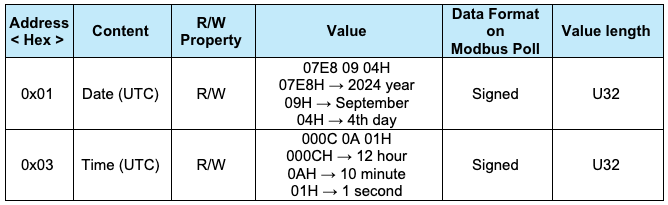
• Write single Register (0x06) command 01 06 0004 07E8 CA75 to set the Modbus holding register address to 0x06 (set device data 2024 year)
• Read holding Register (0x03) command 01 03 0002 0007 A5C8 to read all holding register.
Input Register Address
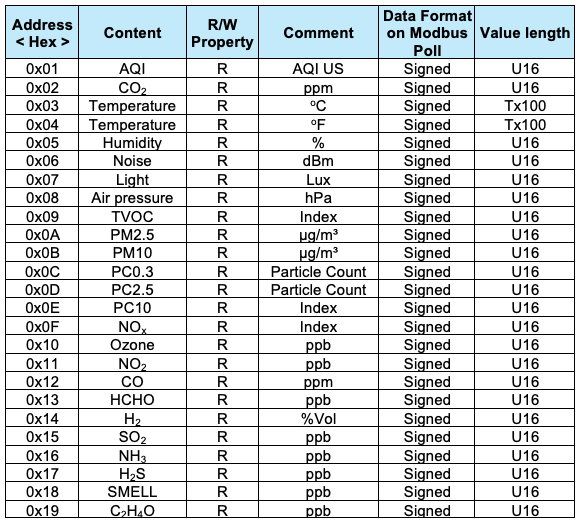
**Note: When the value is 65535, it indicates that the value is invalid**
Example
Read Temperature:
Send:
01 04 00 03 00 02 34 0B
Receive:
01 04 04 41 B7 85 1F 7C C6
'Temperature is: 22.94oC'
Holding Register Address
BACK TO SUPPORT CENTER