BacNet MS-TP Connection
Published

NanoDetect PRO BacNet MS-TP Connectivity
BACnet MS/TP (RS-485) Communication Guide
The NanoDetect PRO sensor supports BACnet MS/TP communication over an RS-485 serial interface. Configuration is performed using the mobile application.
Step 1 Open the mobile application and select “Settings” (bottom right of the screen).
Step 2 Select “Direct Configuration.”
Step 3 Select the sensor type “NanoDetect PRO.”
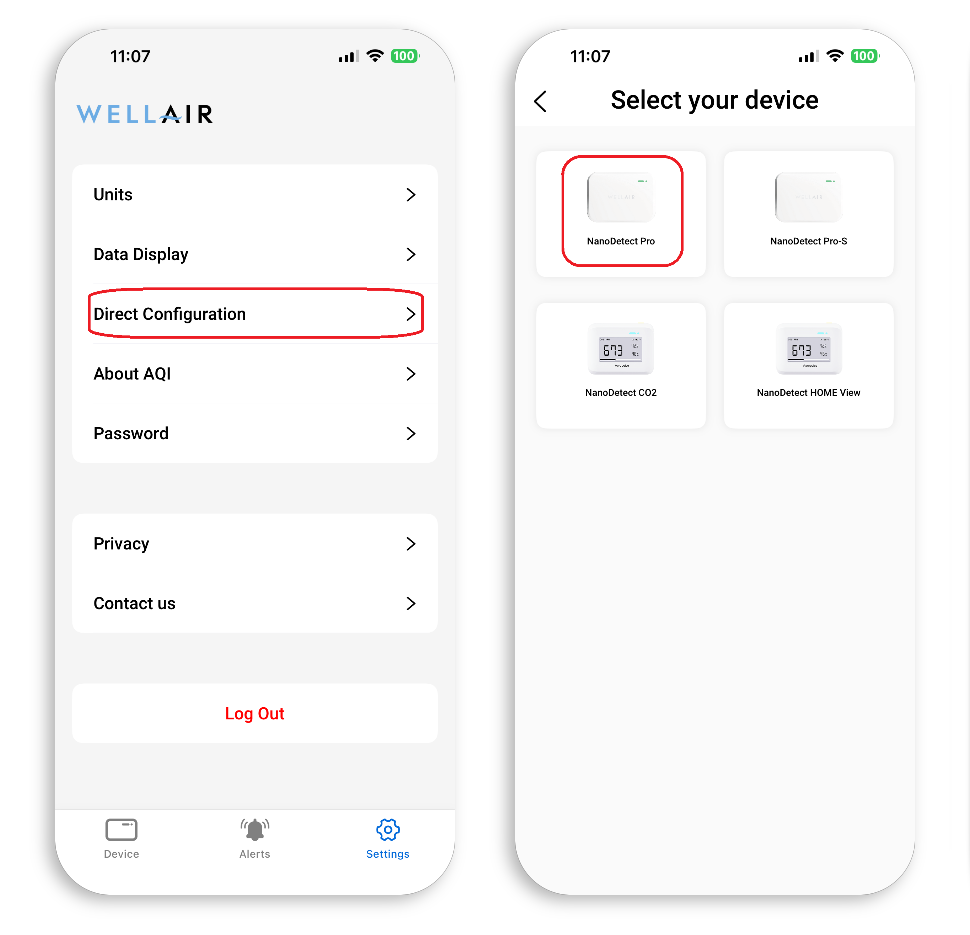
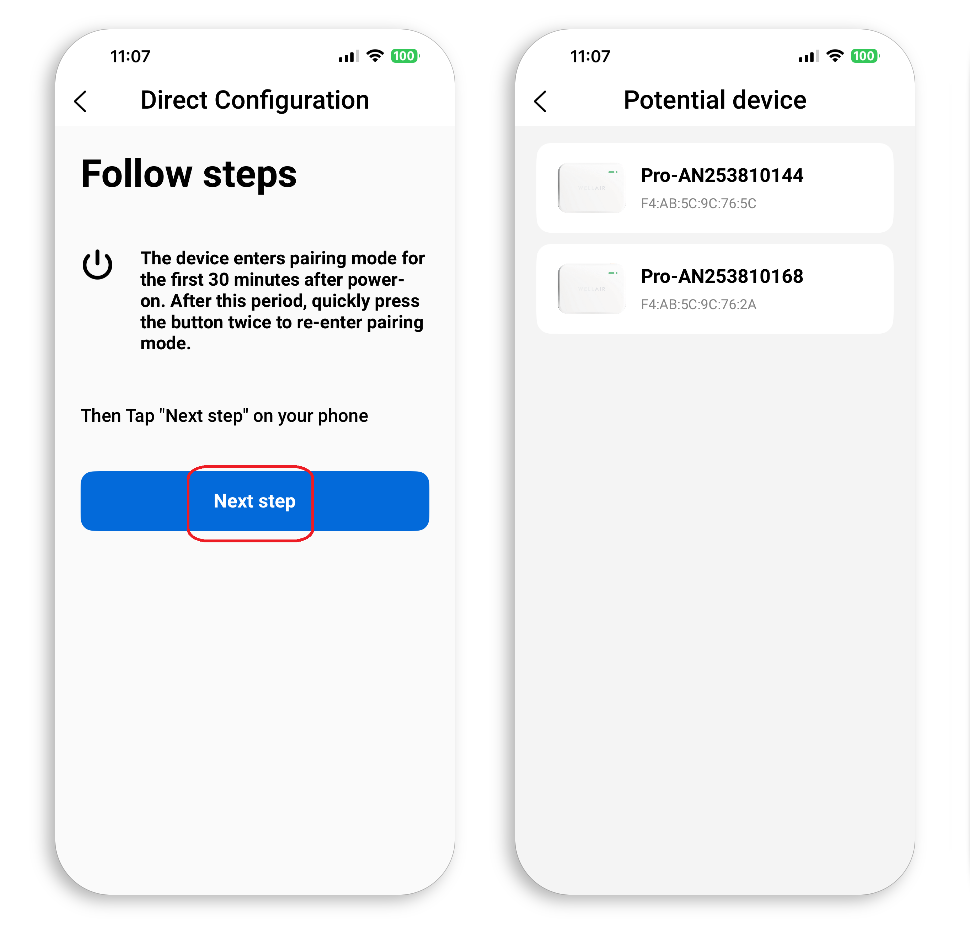
Follow the on-screen instructions to place the device into configuration mode. This can be done either by power cycling the sensor (disconnect and reconnect power) or by pressing the sensor button twice.
Step 4 Select “Next Step” to continue.
A list of available devices will be displayed. Devices are identified by MAC address and device name.
Step 5 Select the appropriate NanoDetect PRO from the list.
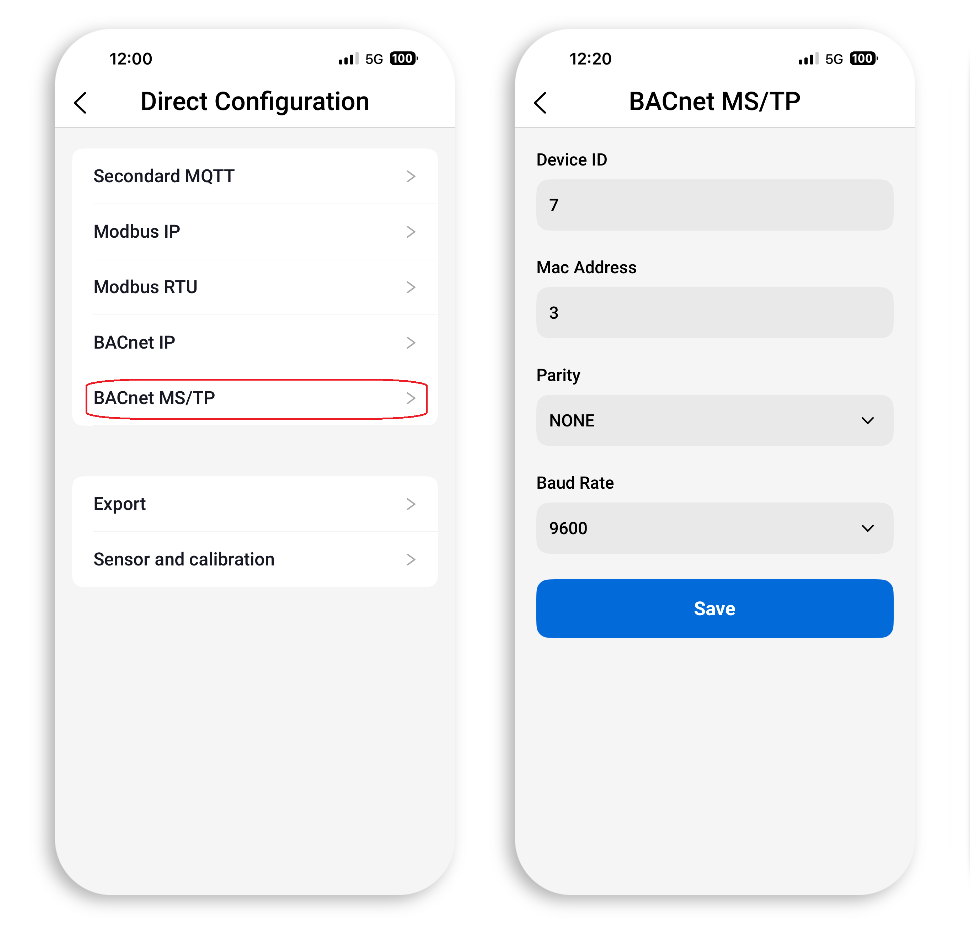
Step 6 From the communication options, select “BACnet MS/TP.”
Step 7 Enter the required BACnet MS/TP parameters:
• Device ID
• MAC Address
• Parity (None, Even, or Odd)
• Baud Rate
Step 8 Select “Save” to apply the settings. A long audible beep confirms successful configuration.
Communication Parameters
The Device ID must be unique across the entire BACnet internetwork. No other BACnet device (including routers or controllers) may use the same Device ID.
The MAC Address must be unique on the local MS/TP trunk. This is a BACnet MS/TP address (typically 0–127), not an Ethernet MAC address. Avoid conflicts with other devices and with the router’s own MAC address.
The Baud Rate and Parity settings must match all other devices on the same MS/TP bus. Mismatched serial parameters will prevent successful communication.
RS-485 Wiring
The NanoDetect PRO provides an RS-485 two-wire differential interface. Connect the twisted pair conductors to the designated A and B terminals on the rear of the device (RS-485 non-isolated differential pair).
Maintain correct polarity across the entire bus (A-to-A and B-to-B). Reversed polarity will prevent communication.
The RS-485 network shall be wired in a linear daisy-chain topology. Star or branched configurations are not recommended.
Use shielded twisted pair cable suitable for RS-485 communication. Connect the cable shield to ground at one end only to avoid ground loops.
If the NanoDetect PRO is installed at the physical end of the RS-485 bus, a 120 Ω termination resistor shall be installed across terminals A and B to provide proper line termination. Termination shall be applied only at the two extreme ends of the bus. Do not install termination resistors on intermediate devices along the trunk.
Refer to BACnet MS/TP and RS-485 installation guidelines for maximum trunk length based on baud rate.
BACnet Protocol
BACnet Interoperability Building Blocks Supported:
DS-RPM-B DS-COVP-B
Segmentation Capability:
Not supported
Standard Object Types Supported: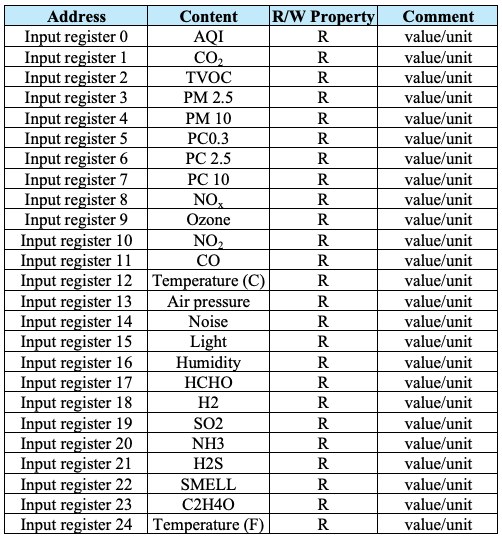
Data Link Layer Options:
MS/TP master (Clause 9), Baud rates: 9600, 19200, 38400, 57600, 76800, 115200
Device Address Binding:
Not supported
Networking Options:
None
Character Set Supported:
ISO 10646 (UTF-8)
BACK TO SUPPORT CENTER